Recently Apple released Safari 5, which included a bug where non-integral right-shifts were not being evaluated properly. There were several reports, both internally and externally, of GWT-based applications unexpectedly crashing when running in Safari 5 (including Google Wave).
Google have a fix for this issue, plus several other house keeping items that have been rolled into a 2.0.4 release, which can be downloaded from GWT’s main download site.
If you’re experiencing the Safari crash, you’ll need to recompile and deploy your GWT app. The changes in 2.0.4 are completely compatible with your existing 2.0 app, and should have no negative impact.
Google Web Toolkit(GWT) Project Home
Showing posts with label Google Web Toolkit. Show all posts
Showing posts with label Google Web Toolkit. Show all posts
Saturday, July 3, 2010
Friday, February 12, 2010
GWT 2.0.2 is now available
 GWT 2.0.2 has been released and is available for download here: http://code.google.com/webtoolkit/download.html

Wednesday, December 9, 2009
Google Web Toolkit 2.0 with Speed Tracer now available
 Google Web Toolkit 2.0 aims to make it easier for developers to build faster apps and to speed up the overall development cycle. Google Web Toolkit 2.0 has emerged with new tools in its toolkit and more features in its core SDK to meet the demands of today's web applications.
Google Web Toolkit (GWT) is a development toolkit for building and optimizing complex browser-based applications. GWT is used by many products at Google, including Google Wave and Google AdWords. It's open source, completely free, and used by thousands of developers around the world.
Google Web Toolkit now offers a new tool called Speed Tracer, a performance profiler for Google Chrome that allows developers to see what's going on in a whole new way by enabling diagnosis of hidden problems. Developer-guided code splitting is another new feature that allows developers to split up their application into multiple pieces for much faster startup times. Users download only the JavaScript they need to get started while the rest can be loaded at a later time.
Video footage of Google Campfire One held on 12/8/09.
Thursday, September 24, 2009
GWT 1.7.1 release fixes Mac OS X Snow Leopard issues
If you don't use Mac OS X 10.6 (Snow Leopard), the GWT 1.7.1 release shouldn't interest you much -- you shouldn't see any changes. If you do use Mac OS X 10.6, good news. Running GWT with Java 6 has become simpler.
Source: Google Web Toolkit Blog: GWT 1.7.1 release fixes Mac OS X Snow Leopard issues
Source: Google Web Toolkit Blog: GWT 1.7.1 release fixes Mac OS X Snow Leopard issues
Tuesday, July 14, 2009
Google Web Toolkit 1.7 Now Available
Refer to the web site Google Web Toolkit - Google Code
Same as the case of Google App Engine Updates; if you installed GWT and Google App Engine using Eclipse with Google Eclipse Plug-in, as described in my previous article "GWT + Google App Engine@Eclipse x Google Eclipse Plug-in", you can update Google Web Toolkit inside Eclipse.
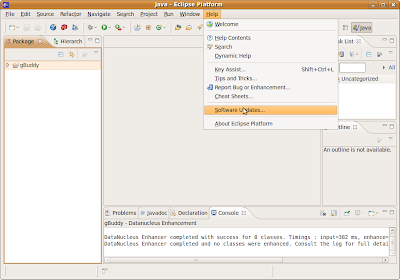
Start Eclipse and, click Help -> Software Updates
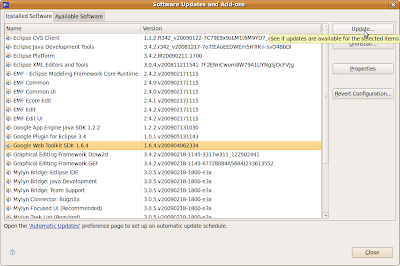
High-light Google Web Toolkit SDK 1.6.4 and click Update...
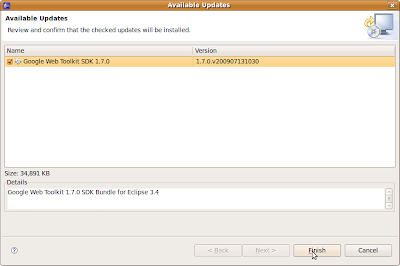
Eclipse can find the update 1.7.0 automatically, just click Finish.
After updated, you will be asked to re-start Eclipse. That's all.
Same as the case of Google App Engine Updates; if you installed GWT and Google App Engine using Eclipse with Google Eclipse Plug-in, as described in my previous article "GWT + Google App Engine@Eclipse x Google Eclipse Plug-in", you can update Google Web Toolkit inside Eclipse.
Start Eclipse and, click Help -> Software Updates

High-light Google Web Toolkit SDK 1.6.4 and click Update...

Eclipse can find the update 1.7.0 automatically, just click Finish.

After updated, you will be asked to re-start Eclipse. That's all.
Friday, July 3, 2009
GWT + Google App Engine@Eclipse x Google Eclipse Plug-in
With Eclipse (3.3 or 3.4) and Google Eclipse Plug-in, you can develope GWT, compile and debug, also deploy to Google App Engine, in one IDE environment.
Eclipse 3.5(Galileo) was just announced, but it is not yet supported by the Google Eclipse Plug-in.
In this article, I will describes how to install Eclipse with Google Eclipse Plug-in, develope (generate) a very basic hello web application, and also deploy to Google App Engine.
Setup:
Ubuntu Linux 9.04
Eclipse Ganymede SR2 Packages
libstdc++5
In order to run Google Web Application, you need to install libstdc++5 also. To Install libstdc++5, type the following in Terminal:
sudo apt-get install libstdc++5
To download Eclipse of older version, Eclipse 3.3(Europa)/Eclipse 3.4(Ganymede), visit the link:
http://wiki.eclipse.org/Older_Versions_Of_Eclipse
Select Eclipse Ganymede SR2 Packages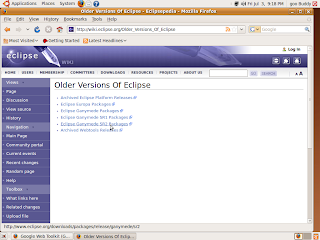
Download Linux 32bit version of Eclipse IDE for Java Developers, save and extract to any location you want, say "eclipse" at your home.
Start Eclipse and install the Plug-in:
To install Google Eclipse Plug-in, start Eclipse, click Help>Software Updates
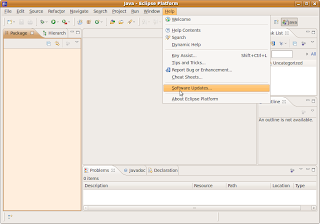
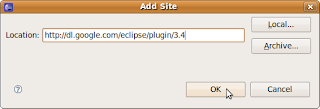
add the site:
http://dl.google.com/eclipse/plugin/3.4 (http://dl.google.com/eclipse/plugin/3.3 if the eclipse you installed is 3.3)
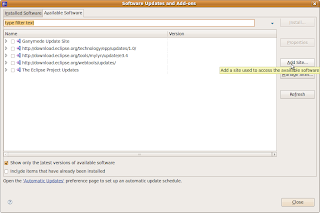
Select Google Update Site for Eclipse 3.4, and click Install and continues the following steps.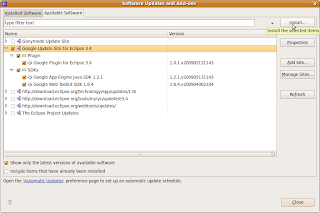
Accept the terms of license agreements and Finish...
After install, you will be asked to re-start Eclipse.
You can develope Web Application after Eclipse restarted:
Click File on the toolbar, -> New -> Web Application Project
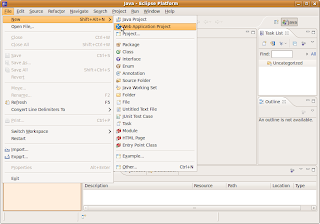
Enter your Project name and Package in the setup page.
A dummy hello Web Application is prepared for you, right click your project, Debug As -> Web Application,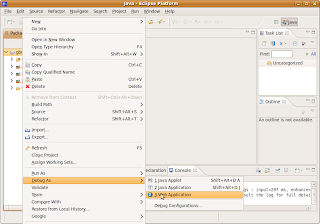
you can see your project started in loal host.
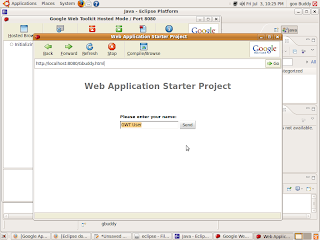
Before you can deploy, you have to register a Appliation-ID from Google:
http://code.google.com/appengine/
To deploy to Google App Engine, right click yout project, Google -> Deploy to App Engine
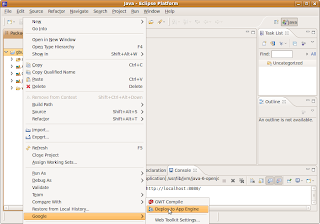
In the deploy dialog, click App Engine project setting..
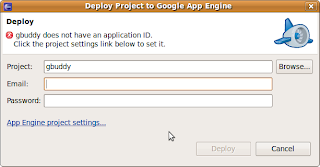
Enter your Application-ID, and click OK return to deploy dialog.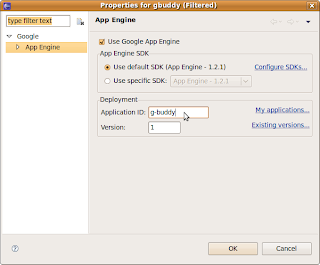
Enter your google account email and password in the deploy dialog, and click deploy.
After Deployment completed successfully, you can see your first Web Appliation on line.
It's my first Web Application:
http://g-buddy.appspot.com/
Eclipse 3.5(Galileo) was just announced, but it is not yet supported by the Google Eclipse Plug-in.
In this article, I will describes how to install Eclipse with Google Eclipse Plug-in, develope (generate) a very basic hello web application, and also deploy to Google App Engine.
Setup:
Ubuntu Linux 9.04
Eclipse Ganymede SR2 Packages
libstdc++5
In order to run Google Web Application, you need to install libstdc++5 also. To Install libstdc++5, type the following in Terminal:
sudo apt-get install libstdc++5
To download Eclipse of older version, Eclipse 3.3(Europa)/Eclipse 3.4(Ganymede), visit the link:
http://wiki.eclipse.org/Older_Versions_Of_Eclipse
Select Eclipse Ganymede SR2 Packages

Download Linux 32bit version of Eclipse IDE for Java Developers, save and extract to any location you want, say "eclipse" at your home.
Start Eclipse and install the Plug-in:
To install Google Eclipse Plug-in, start Eclipse, click Help>Software Updates

add the site:
http://dl.google.com/eclipse/plugin/3.4 (http://dl.google.com/eclipse/plugin/3.3 if the eclipse you installed is 3.3)


Select Google Update Site for Eclipse 3.4, and click Install and continues the following steps.

Accept the terms of license agreements and Finish...
After install, you will be asked to re-start Eclipse.
You can develope Web Application after Eclipse restarted:
Click File on the toolbar, -> New -> Web Application Project

Enter your Project name and Package in the setup page.
A dummy hello Web Application is prepared for you, right click your project, Debug As -> Web Application,

you can see your project started in loal host.

Before you can deploy, you have to register a Appliation-ID from Google:
http://code.google.com/appengine/
To deploy to Google App Engine, right click yout project, Google -> Deploy to App Engine

In the deploy dialog, click App Engine project setting..

Enter your Application-ID, and click OK return to deploy dialog.

Enter your google account email and password in the deploy dialog, and click deploy.
After Deployment completed successfully, you can see your first Web Appliation on line.
It's my first Web Application:
http://g-buddy.appspot.com/
Tuesday, June 16, 2009
Google Plugin for Eclipse

Google Plugin for Eclipse
The Google Plugin for Eclipse is the fastest way to start developing Google Web Toolkit and App Engine applications, allowing you to go from installing the plugin to deploying an Ajax "Hello World" in a matter of minutes. Simply install the plugin and get started. If you don't have the GWT and App Engine SDKs installed, the plugin can take care of that for you.
The plugin currently supports Google App Engine and Google Web Toolkit development.
GWT and Google App Engine
In this tutorial, GWT and Google App Engine, you'll deploy a example application of Google Web Toolkit on Google App Engine. Also, you'll learn about some of the App Engine service APIs and use them to personalize the example application so that users can log into their Google Account and retrieve their list of stocks.
Google Web Toolkit
With Google Web Toolkit (GWT), you write your AJAX front-end in the Java programming language which GWT then cross-compiles into optimized JavaScript that automatically works across all major browsers. During development, you can iterate quickly in the same "edit - refresh - view" cycle you're accustomed to with JavaScript, with the added benefit of being able to debug and step through your Java code line by line. When you're ready to deploy, GWT compiles your Java source code into optimized, standalone JavaScript files. Easily build one widget for an existing web page or an entire application using Google Web Toolkit.
Product Overview
Product Overview
Writing web apps today is a tedious and error-prone process. Developers can spend 90% of their time working around browser quirks. In addition, building, reusing, and maintaining large JavaScript code bases and AJAX components can be difficult and fragile. Google Web Toolkit (GWT) eases this burden by allowing developers to quickly build and maintain complex yet highly performant JavaScript front-end applications in the Java programming language.
Subscribe to:
Posts (Atom)


