Showing posts with label Google App Engine. Show all posts
Showing posts with label Google App Engine. Show all posts
Wednesday, May 18, 2011
Thursday, April 22, 2010
App Engine SDK 1.3.3 Released
Google released version 1.3.3 of the App Engine SDK for both Java and Python. This is a minor release that includes changes and a few issue fixes for the datastore, administration console, and when deploying applications. For more information on all the changes, please read the 1.3.3 release notes for Java and Python.
Source: Google App Engine Blog: App Engine SDK 1.3.3 Released
Source: Google App Engine Blog: App Engine SDK 1.3.3 Released

Friday, March 26, 2010
App Engine SDK 1.3.2 Released
Google announced the release of version 1.3.2 of the App Engine SDK for both the Java and Python runtimes. 1.3.2 includes a number of changes and bug fixes.
Source>>>
Source>>>
Tuesday, December 15, 2009
App Engine Site Creator

App Engine Site Creator is designed to be a highly extensible and light weight content management system. It features a user-friendly content editing interface, a high degree of flexibility and customization, a file sharing mechanism, full support for page hierarchies, and fine-grained mechanisms for user management and access controls. It is built to run on Google App Engine and to scale well with minimal engineering maintenance.
App Engine SDK version 1.3.0 released, available to both Java and Python developers.
App Engine SDK 1.3.0 was just released on December 14, 2009, including support for Larger User Uploads.
Source: Google App Engine Blog: App Engine SDK 1.3.0 Released Including Support for Larger User Uploads.
Web Si te of Google App Engine >>
Source: Google App Engine Blog: App Engine SDK 1.3.0 Released Including Support for Larger User Uploads.
Web Si
te of Google App Engine >>
Saturday, December 5, 2009
App Engine SDK 1.2.8 Released
Enhanced Admin Console - Users will notice new tools for managing tasks and queues created with the Task Queue API, and more visibility into index processing.
Improved Java Compatibility - This release adds support for new filter operators and inheritance to JPA and JDO as well as support for JAXB, the single most requested feature for the Java SDK.
This was also the first release "previewed" with developers before formally rolling out changes.
Source: Google App Engine Blog: App Engine SDK 1.2.8 Released Including New Admin Console features
Improved Java Compatibility - This release adds support for new filter operators and inheritance to JPA and JDO as well as support for JAXB, the single most requested feature for the Java SDK.
This was also the first release "previewed" with developers before formally rolling out changes.
Source: Google App Engine Blog: App Engine SDK 1.2.8 Released Including New Admin Console features
Friday, October 16, 2009
App Engine SDK 1.2.7 - Bugfix Release for Python
Due to two issues introduced in the 1.2.6 release of the Python SDK, Google are releasing version 1.2.7. This is a bugfix-only release with just a few minor changes (no new features or functionality); all users of App Engine for Python should upgrade to the new version, available on Downloads page.
The two issues were:
- The 1.2.6 release added a key argument to the Model class constructor that broke subclasses who were calling the constructor's private arguments with positional (not named) values. The fix is to restore the original ordering, and require that the new key argument be specified as a named argument only.
- The 1.2.6 release broke an interaction between remote_api and the local development app server.
Friday, September 4, 2009
Google App Engine SDK 1.2.5 released for Python and Java, now with XMPP support
 Google App Engine SDK 1.2.5 released for Python and Java, the first simultaneous release across both runtimes. The great new functionality in this release including XMPP!
Source: Google App Engine Blog: App Engine SDK 1.2.5 released for Python and Java, now with XMPP support
Google App Engine HOME
Friday, August 7, 2009
Google App Engine Python SDK version 1.2.4 released
Version 1.2.4 - August 6, 2009
Google App Engine's Home
- Added support for kindless queries, ie. transaction descendant queries.
- Composite indexes no longer required for certain types of key queries.
- Improved exception reporting in the bulkloader.
- Datastore transaction RPC sent at beginning of transaction rather than upon first Datastore request.
- PolyModel supports keys_only query.
- Remote API supports more API's (Images, Memcache and URLFetch).
- Remote API shell.
- Support for multiple inheritance for Model and PolyModel.
- Enhancement to SearchableModel allowing multiple properties to be indexed.
- Various code quality improvements.
Google App Engine's Home
Tuesday, July 14, 2009
Google App Engine for Java SDK 1.2.2 Released
Google announced on July 13, 2009, the availability of a new Google App Engine for Java SDK 1.2.2.
This is largely a bugfix release, but there are a few new features:
If you installed GWT and Google App Engine using Eclipse with Google Eclipse Plug-in, as described in my previous article "GWT + Google App Engine@Eclipse x Google Eclipse Plug-in", you can update Google App Engine inside Eclipse.
Start Eclipse and, click Help -> Software Updates

High-light Google App Engine Java SDK 1.2.1 and click Update...

Eclipse can find the update 1.2.2 automatically, just click Finish.

After updated, you will be asked to re-start Eclipse. That's all.
This is largely a bugfix release, but there are a few new features:
- The appcfg upload tool includes proxy support.
- JDO and JPA support an extension that lets you mark individual fields as "unindexed."
- At long last, the dev appserver has a data viewer. Start your app locally and point your browser to http://localhost:8080/_ah/admin to check it out.
- The local datastore now has the same transaction behavior as the production datastore.
- You can issue ancestor queries inside transactions.
If you installed GWT and Google App Engine using Eclipse with Google Eclipse Plug-in, as described in my previous article "GWT + Google App Engine@Eclipse x Google Eclipse Plug-in", you can update Google App Engine inside Eclipse.
Start Eclipse and, click Help -> Software Updates

High-light Google App Engine Java SDK 1.2.1 and click Update...

Eclipse can find the update 1.2.2 automatically, just click Finish.

After updated, you will be asked to re-start Eclipse. That's all.
Friday, July 3, 2009
GWT + Google App Engine@Eclipse x Google Eclipse Plug-in
With Eclipse (3.3 or 3.4) and Google Eclipse Plug-in, you can develope GWT, compile and debug, also deploy to Google App Engine, in one IDE environment.
Eclipse 3.5(Galileo) was just announced, but it is not yet supported by the Google Eclipse Plug-in.
In this article, I will describes how to install Eclipse with Google Eclipse Plug-in, develope (generate) a very basic hello web application, and also deploy to Google App Engine.
Setup:
Ubuntu Linux 9.04
Eclipse Ganymede SR2 Packages
libstdc++5
In order to run Google Web Application, you need to install libstdc++5 also. To Install libstdc++5, type the following in Terminal:
sudo apt-get install libstdc++5
To download Eclipse of older version, Eclipse 3.3(Europa)/Eclipse 3.4(Ganymede), visit the link:
http://wiki.eclipse.org/Older_Versions_Of_Eclipse
Select Eclipse Ganymede SR2 Packages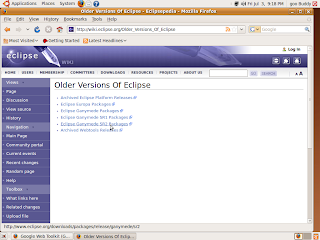
Download Linux 32bit version of Eclipse IDE for Java Developers, save and extract to any location you want, say "eclipse" at your home.
Start Eclipse and install the Plug-in:
To install Google Eclipse Plug-in, start Eclipse, click Help>Software Updates
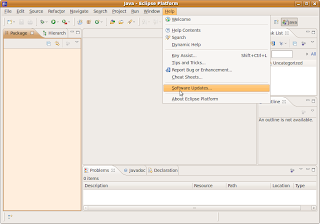
add the site:
http://dl.google.com/eclipse/plugin/3.4 (http://dl.google.com/eclipse/plugin/3.3 if the eclipse you installed is 3.3)
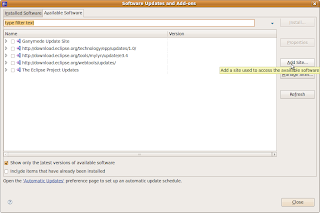
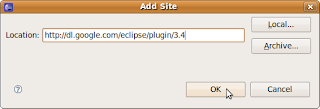
Select Google Update Site for Eclipse 3.4, and click Install and continues the following steps.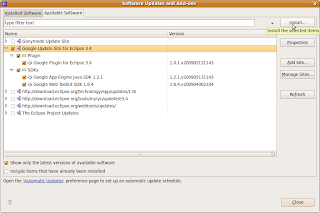
Accept the terms of license agreements and Finish...
After install, you will be asked to re-start Eclipse.
You can develope Web Application after Eclipse restarted:
Click File on the toolbar, -> New -> Web Application Project
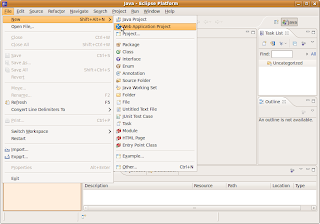
Enter your Project name and Package in the setup page.
A dummy hello Web Application is prepared for you, right click your project, Debug As -> Web Application,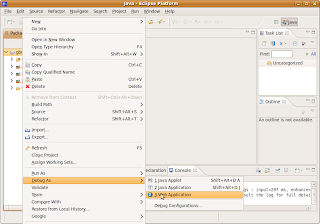
you can see your project started in loal host.
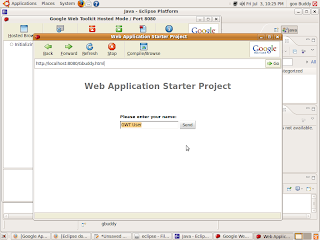
Before you can deploy, you have to register a Appliation-ID from Google:
http://code.google.com/appengine/
To deploy to Google App Engine, right click yout project, Google -> Deploy to App Engine
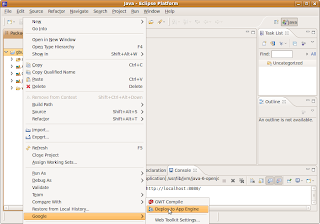
In the deploy dialog, click App Engine project setting..
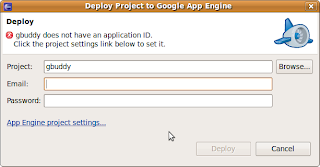
Enter your Application-ID, and click OK return to deploy dialog.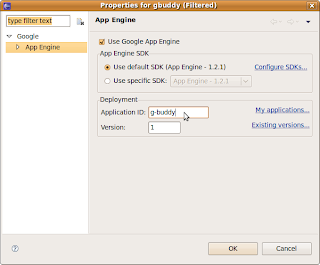
Enter your google account email and password in the deploy dialog, and click deploy.
After Deployment completed successfully, you can see your first Web Appliation on line.
It's my first Web Application:
http://g-buddy.appspot.com/
Eclipse 3.5(Galileo) was just announced, but it is not yet supported by the Google Eclipse Plug-in.
In this article, I will describes how to install Eclipse with Google Eclipse Plug-in, develope (generate) a very basic hello web application, and also deploy to Google App Engine.
Setup:
Ubuntu Linux 9.04
Eclipse Ganymede SR2 Packages
libstdc++5
In order to run Google Web Application, you need to install libstdc++5 also. To Install libstdc++5, type the following in Terminal:
sudo apt-get install libstdc++5
To download Eclipse of older version, Eclipse 3.3(Europa)/Eclipse 3.4(Ganymede), visit the link:
http://wiki.eclipse.org/Older_Versions_Of_Eclipse
Select Eclipse Ganymede SR2 Packages

Download Linux 32bit version of Eclipse IDE for Java Developers, save and extract to any location you want, say "eclipse" at your home.
Start Eclipse and install the Plug-in:
To install Google Eclipse Plug-in, start Eclipse, click Help>Software Updates

add the site:
http://dl.google.com/eclipse/plugin/3.4 (http://dl.google.com/eclipse/plugin/3.3 if the eclipse you installed is 3.3)


Select Google Update Site for Eclipse 3.4, and click Install and continues the following steps.

Accept the terms of license agreements and Finish...
After install, you will be asked to re-start Eclipse.
You can develope Web Application after Eclipse restarted:
Click File on the toolbar, -> New -> Web Application Project

Enter your Project name and Package in the setup page.
A dummy hello Web Application is prepared for you, right click your project, Debug As -> Web Application,

you can see your project started in loal host.

Before you can deploy, you have to register a Appliation-ID from Google:
http://code.google.com/appengine/
To deploy to Google App Engine, right click yout project, Google -> Deploy to App Engine

In the deploy dialog, click App Engine project setting..

Enter your Application-ID, and click OK return to deploy dialog.

Enter your google account email and password in the deploy dialog, and click deploy.
After Deployment completed successfully, you can see your first Web Appliation on line.
It's my first Web Application:
http://g-buddy.appspot.com/
Tuesday, June 16, 2009
Google Plugin for Eclipse

Google Plugin for Eclipse
The Google Plugin for Eclipse is the fastest way to start developing Google Web Toolkit and App Engine applications, allowing you to go from installing the plugin to deploying an Ajax "Hello World" in a matter of minutes. Simply install the plugin and get started. If you don't have the GWT and App Engine SDKs installed, the plugin can take care of that for you.
The plugin currently supports Google App Engine and Google Web Toolkit development.
GWT and Google App Engine
In this tutorial, GWT and Google App Engine, you'll deploy a example application of Google Web Toolkit on Google App Engine. Also, you'll learn about some of the App Engine service APIs and use them to personalize the example application so that users can log into their Google Account and retrieve their list of stocks.
Tuesday, May 26, 2009
Google App Engine
Run your web apps on Google's infrastructure.
Easy to build, easy to maintain, easy to scale.
Google App Engine Home
Google App Engine lets you run your web applications on Google's infrastructure. App Engine applications are easy to build, easy to maintain, and easy to scale as your traffic and data storage needs grow. With App Engine, there are no servers to maintain: You just upload your application, and it's ready to serve your users.
Know more about What Is Google App Engine?
Easy to build, easy to maintain, easy to scale.
Google App Engine Home
Google App Engine lets you run your web applications on Google's infrastructure. App Engine applications are easy to build, easy to maintain, and easy to scale as your traffic and data storage needs grow. With App Engine, there are no servers to maintain: You just upload your application, and it's ready to serve your users.
Know more about What Is Google App Engine?
Subscribe to:
Posts (Atom)


